Developer Guide
Table of contents
- Developer’s Guide
- Product scope
- Design & Implementation
- Appendix A: Product Scope
- Appendix B: User Stories
- Appendix C: Non-Functional Requirements
- Appendix D: Glossary
- Appendix E: Instructions for manual testing
- Launch and shutdown
- Saving and Loading Data
- Viewing birthdays
- Viewing vaccination status
- Viewing dietary preference
- Viewing blood pressure
- List
- Help
- Bye
- Finding elderly by medicine
- Finding elderly by diet
- Finding elderly by name
- Deleting elderly from records
- Deleting elderly medicine from records
- Deleting elderly appointment from records
- Deleting elderly next of kin from records
- Deleting elderly medical history from records
- Adding an elderly to the program
- Adding a medicine schedule to an elderly
- Adding a medical appointment to an elderly
- Adding next-of-kin details to an elderly
- Adding record details to an elderly
- Adding medical history details to an elderly
- Adding birthday to an elderly
- Sets vaccination status to an elderly
- Adding dietary preference to an elderly
- Adding blood pressure reading to an elderly
Product scope
Hi, welcome to the Elderly in Your Hood. This is a product that has been developed in order to empower service personnel. Service personnel now have a convenient and organised method to store information about the elderly they are assisting in an elderly home.
Target user profile
It is for service staffs at the elderly home who works at a PC, prefers typing, and wants to avoid the tedious tracking of details of each and every elderly they are assisting.
Value proposition
Helpers in elderly care homes are often flooded with information. Different elderly has different conditions, and require so many methods of care. Traditionally, information are stored as hardcopy in the forms of placards are information books. However, with our program, we plan to centralise the different information each elderly has, and allow the helper, a fast typer, to add and retrieve elderly information with ease. This increases productivity.
Design & implementation
Addition of Elderly
Implementation
Before the user can do anything, he has to first add some elderly into the system (Details of
addelderly function is in UG). We created a ElderlyList class to handle the addition of elderly,
and a RegexChecker class to check for validity of the input. Various elderly subclasses are added
as well. (Further explained in Elderly Risk Categorisation)
Below is a UML sequence diagram for the process of addition of elderly:
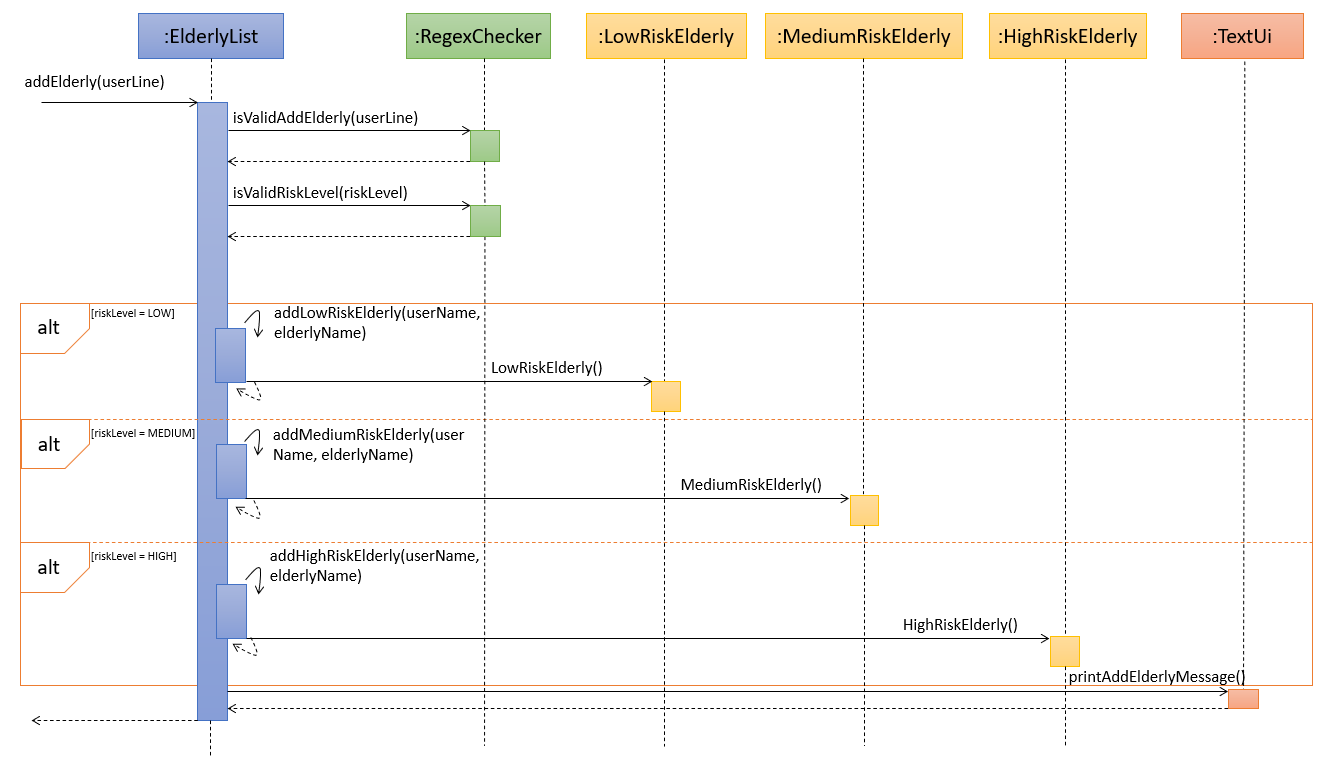
How the classes interact with each other
addElderly()in the classElderlyListis run, supplied with the inputuserline, and methods from theTextUi class will interact with theuserLine`- Regex checks from
RegexCheckerclassisValidAddElderly()andisValidRiskLevel()are run in order to check if the inputs in theuserLineare valid - Depending on the
riskLevel,elderlyis added into respective subclasses (Further explained in Elderly Risk Categorisation) - Message to notify the users that the elderly has been added is printed via
TextUi
Elderly risk categorisation
Implementation
The elderly risk categorisation is an addition to the current abstract Elderly class. It utilises
polymorphism, creating three subclasses LowRiskElderly, MediumRiskElderly, HighRiskElderly,
all of which inherits from the abstract Elderly class. In addition, to achieve better encapsulation,
fields in each of the class are declared as private.
Since the MediumRiskElderly and HighRiskElderly needs to receive hospitalisation at appropriate timing,
they are implemented with the interface Hospitalisable where its assigned hospital, medical conditions
as well as special notes to take care of them can be returned via the methods in the interface.
Additionally, 2 new classes are implemented:
Hospital— A class that contains information about a hospital, and contains a list of all its doctors.Doctor— A class that contains information about a doctor
Below is a UML class diagram for the elderly risk categorisation:

How the classes interact with each other
LowRiskElderly, MediumRiskElderly and HighRiskElderly are expected to contain all current
attributes and methods that Elderly class is supposed to have.
In addition, MediumRiskElderly and HighRiskElderly are tagged with extra information,
specifically Hospital, Conditions and NotesOnCare. Conditions is an array string that
contains all the conditions the elderly has, while NotesOnCare is just a string that sequentially
lists tips to care for elderly. Each elderly here is tagged to 1 Hospital.
Finally, HighRiskElderly is also tagged with Doctor. Each elderly here is tagged to 1 Doctor.
Every Hospital has 1 or more Doctor, stored in an ArrayList of type Doctor.
Design considerations
Since our TP is only intended for one user (i.e. the caretaker in the elderly home), the input of
Hospital and Doctor data should not be done by them. As such, we have made it such that they are
preset. Hospital and Doctor data are made to be fixed, as we make the assumption that the
Hospital and Doctor that the MediumRiskElderly and HighRiskElderly are looking for
are already there.
Addition of Next-of-Kin and Record Classes
Implementation
The Elderly class interacts with two classes, which is Next-of-Kin class and Record class. As can
be seen by the association between the three classes, the Elderly class stores Next-of-Kin and Record
as ArrayLists in its attributes.
Next-of-Kinclass stores the contact information of the Next-of-Kin, such as name, phone number, email, address and relationship to the ElderlyRecordstores the details of the Elderly, such as the elderly phone number and address
This information in both classes is then stored in Elderly class.
UML Diagram of the interaction between classes is shown below:
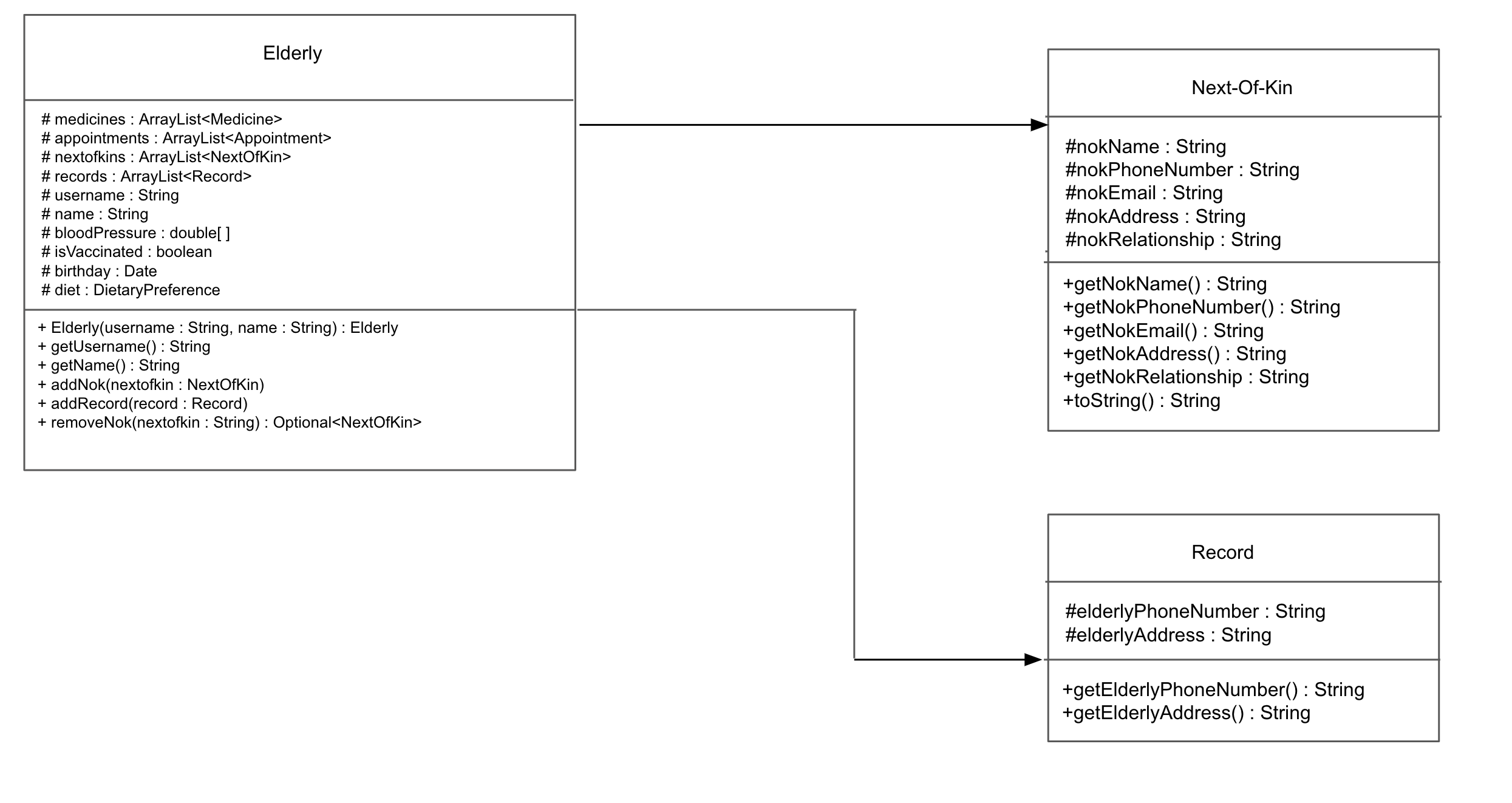
Interaction of Classes
Elderly class will interact with Next-of-kin class through the use of addNok() function. This function will
add and store the Next-of-Kin information into the given elderly. It is possible to store more than
one Next-of-Kin information per elderly, as the information will all be stored in an Array List. This is to
cater to the possibility that the elderly has more than one point of contact. Multiple points of contact is also
extremely useful for the user as it increases the possibility to reach an emergency contact and
ensure a higher sense of security for the elderly.
This Next-of-Kin information can be retrieved at any point by using the viewNok() function.
Elderly class also interacts with the Next-of-Kin class through the use of removeNok() function. This function
deletes the particular Next-of-Kin information stored in the Elderly class, as specified by the user. The Array List
will no longer reflect the deleted Next-of-Kin information, likewise viewNok() will not have this information stored as well.
Interaction of the Record class is also similar to the previous interaction. However, the elderly information is
now stored instead. Similarly, addRecord() function is called to store the details of the elderly and viewRecord()
is used to view the details that are stored.
Future Implementation and Considerations
removeRecord() function has not been implemented yet as it is deemed to be not critical in this current phase.
However, it is a large possibility that the elderly would have a change in their phone number and address. In this current
implementation, it is still possible for the user to input the new details, as the details are stored in an Array List.
However, it is not the most ideal solution as there might be too many details which can be confusing for the user.
Moreover, there is no indication to show which is the current details that is accurate. Hence, this function should be
implemented in the future to help improve the usability and convenience of the overall user experience.
Creation of New Objects Stored in ElderlyList Class
Design and Implementation
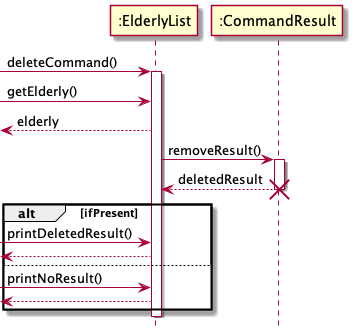
Below is the Sequence Diagram for creating new objects which will be stored in ElderlyList Class:
Deletion of Objects Stored in ElderlyList Class
Design and Implementation
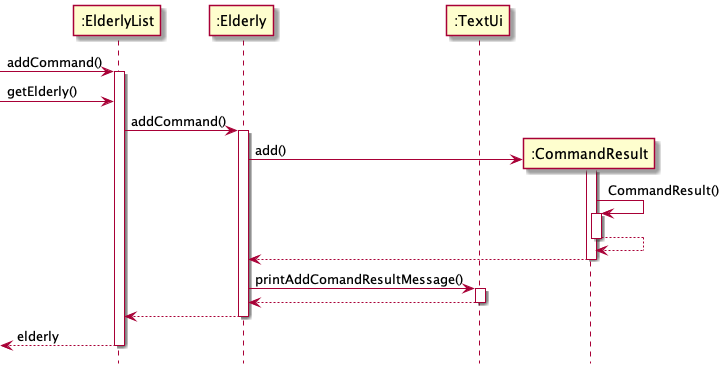
Below is the Sequence Diagram for deletion of objects which are stored in ElderlyList Class:
Autosuggestions for search functions
Problems Faced
For fast typers, they may misspell words and are somehow convinced that their spelling is correct. Furthermore, as our program mainly deals with usernames, medicine names, etc., they may be cryptic and difficult to remember.
Solution to said problems
We opted to have an autosuggestion function that will look for the closest possible search result in the store of the program.
Details of solution
We used a concept known as Levenshtein Distance to check the similarities between 2 strings.
For brevity, I will attempt to explain the concept here. In essence, it checks what are the number
of edits made at position i of 2 strings. This can be better illustrated with an example.
Given that we have a medicine panadol in the system and a misspelt user query of parasol.
Assuming we have i as the iterator for panadol and j as the iterator of parasol. At position
i=3 and j=3, there is a change of 1 character from n->r so lev_i,j(3,3) = 1 as 1 edit is
required. At lev_i,j(7,7), there would have been a total of 2 characters changed.

Image of Levenshtein Distance Function
The function above is applied to both strings and its results are compounded. We then take a ratio of the number of unchanged characters over the total number of characters in both strings to determine how similar the 2 strings are.
How is it applied to the program?
When using the findbymed, findbydiet, findbyname functions, they will take generate a set of
medicine, diets and real names respectively. The function checkSimilarities in ElderlyList.class
will then iterate through each item in the set and compare it with the query term. If there is a
similarity score of >=0.8, the closest match will be printed.
How did you determine that the magic similarity value to be used is 0.8?
It was through vigorous trial and testing that 0.8 seems like the most appropriate value.
An example of AutoSuggestions
Assuming we have an elderly that exist in the system called John Tan. We, as the user, remember
that his name was <SOMETHING> Tan, and it was either Josh or John. We try Josh
first.

Instead of just prompting that the system could not find Josh Tan, the search term went through
the Levenshtein Distance logic and the name John Tan returned with a result of 0.9375. As you
can see, this was our intended result and showcases the intended solution to our problem.
Potential Shortcomings of this function
There may be two strings that have similar edit distance to each other but may not be related to
each other. This will include words like sitting and kitten for example. This may give
inaccurate suggestions. However, since this is not a key function and is only meant to be a
complementary tool, it will not be a major problem.
Appendix A: Product Scope
Target user profile
Caregivers who are fast typists and prefer Command Line Interface(CLI) for their duties.
Value proposition
- Easily manage patient information
- Easily manage patient schedules and appointments
Appendix B: User Stories
| Version | As a … | I want to … | So that I can … |
|---|---|---|---|
| v1.0 | helper | add elderly | keep track of the list of all elderly |
| v1.0 | helper | store hospital appointment dates | keep track of all hospital appointment dates for each elderly |
| v1.0 | helper | view hospital appointment dates | view all the hospital appointment dates for each elderly |
| v1.0 | helper | store elderly medicine types | keep track of the medicine for each elderly |
| v1.0 | helper | view elderly medicine types | ensure that the elderly will take the right medicine on time |
| v2.0 | helper | categorise elderly by risk their levels | pay more attention to elderly of higher risk |
| v2.0 | helper | add hospital information to medium and high risk elderly | store hospital information specific to the elderly |
| v2.0 | helper | view hospital information to medium and high risk elderly | utilise hospital information during emergency |
| v2.0 | helper | add medical history | keep track of all the medical history of the elderly |
| v2.0 | helper | view medical history | view of all the medical history of the elderly when it is needed (such as bringing the elderly for a health check-up) |
| v2.0 | helper | add conditions of medium and high risk elderly | keep track of conditions specific to the elderly |
| v2.0 | helper | view conditions of medium and high risk elderly | view the conditions of the elderly |
| v2.0 | helper | add notes on care of medium and high risk elderly | enable other helpers can render assistance specific to the elderly |
| v2.0 | helper | view notes on care of medium and high risk elderly | take notes on how to care for the elderly |
| v2.0 | helper | add doctor information to high risk elderly | store doctor information specific to the elderly |
| v2.0 | helper | view doctor information to high risk elderly | utilise doctor information during emergency |
Appendix C: Non-Functional Requirements
- Should work on any mainstream OS as long as it has
Java 11or above installed. - The product is not required to ensure that the dosage of medicine keyed are safe.
- The product should work on both 32-bit and 64-bit system.
- This version of product does not allow users to manually add additional hospital and doctors.
Appendix D: Glossary
- Mainstream OS - Windows, Linux, Unix, OS-X
Appendix E: Instructions for manual testing
Given below are instructions to test the app manually.
Launch and shutdown
- Initial launch
- Download the jar file and copy into working directory
- Launch it with
java -jar ElderlyInTheHood.jar
- Shutdown of program
- Launch the
byecommand to exit
- Launch the
Saving and Loading Data
Data from the current running instance of the program can be stored in persistent storage.
It will save to the filename specified by the user in the local directory.
While program is being run, run load fp/[FILENAME.json]
Note: Filename can only consist of characters and must end with .json.
View User Guide for more information.
Data can be restored from the file specified.
Storing into wrong file location
Test Case: Storing into a file that you are unable to write to
- On your system, traverse to a place you cannot write to.
- Copy the JAR file there.
- Run the program and run
store fp/data.json - Expected output:
data.json (Access is denied)
Dealing with corrupted data files
Test Case 1: Loading from file, a user with an invalid appointment date 32132021
- Create a file data.json in the local directory with the following contents
[ { "medicines": [], "appointments": [], "nextofkins": [], "records": [], "username": "nguyin", "name": "rebecca ng", "bloodPressure": [ -1, -1 ], "isVaccinated": false, "diet": "NOT_SET", "medicalHistory": "", "type": "seedu.duke.common.LowRiskElderly" }, { "medicines": [], "appointments": [ { "location": "khoo teck puat hospital", "date": "32132021", "time": "0900", "purpose": "general checkup" } ], "nextofkins": [], "records": [], "username": "owinsoh", "name": "owen soh", "bloodPressure": [ -1, -1 ], "isVaccinated": false, "diet": "NOT_SET", "medicalHistory": "", "type": "seedu.duke.common.LowRiskElderly" } ] - In the running instance of the program, call
load fp/data.json. This is the expected result:[*] data.json exists. Loading from file! [!] owinsoh object has issue! [!] File is in the wrong format, could not load! - Rectify the error, and load again. The
loadcommand will not successfully load unless the file is in the format
Test Case 2: Loading from file, a user with a different type Integer instead of String
- Create a file data.json in the local directory with the following contents
[ { "medicines": [], "appointments": [], "nextofkins": [], "records": [], "username": "nguyin", "name": "rebecca ng", "bloodPressure": [ -1, -1 ], "isVaccinated": false, "diet": 123, "medicalHistory": "", "type": "seedu.duke.common.LowRiskElderly" }, { "medicines": [], "appointments": [ { "location": "khoo teck puat hospital", "date": "31122021", "time": "0900", "purpose": "general checkup" } ], "nextofkins": [], "records": [], "username": "owinsoh", "name": "owen soh", "bloodPressure": [ -1, -1 ], "isVaccinated": false, "diet": "NOT_SET", "medicalHistory": "", "type": "seedu.duke.common.LowRiskElderly" } ] - In the running instance of the program, call
load fp/data.json. This is the expected result:[*] data.json exists. Loading from file! [!] File is in the wrong format, could not load!
Loading from a file in the correct format
Test Case: Loading from a file with the correct format
- Create a file data.json in the local directory with the following contents
[ { "medicines": [], "appointments": [], "nextofkins": [], "records": [], "username": "nguyin", "name": "rebecca ng", "bloodPressure": [ -1, -1 ], "isVaccinated": false, "diet": "NOT_SET", "medicalHistory": "", "type": "seedu.duke.common.LowRiskElderly" }, { "medicines": [], "appointments": [ { "location": "khoo teck puat hospital", "date": "31122021", "time": "0900", "purpose": "general checkup" } ], "nextofkins": [], "records": [], "username": "owinsoh", "name": "owen soh", "bloodPressure": [ -1, -1 ], "isVaccinated": false, "diet": "NOT_SET", "medicalHistory": "", "type": "seedu.duke.common.LowRiskElderly" } ] - In the running instance of the program, call
load fp/data.json. This is the expected result:[*] data1.json exists. Loading from file!
Viewing birthdays
Birthdays that has been added to an elderly can be viewed.
While program is being run, run viewbirthday u/USER_NAME
View UG-viewbirthday for more information.
Viewing from invalid username for birthdays
Test Case: Viewing birthday of a non-existent username
- On the program, attempt to view birthday of non-existent username
> viewbirthday u/random_username
 Invalid input detected
 Correct input format: viewbirthday u/USER_NAME
Viewing from valid username, but birthday has not been set
Test Case: Viewing birthday of an existent username, but birthday has not been set
- On the program, attempt to view birthday of existent username, but birthday not set
> viewbirthday u/hotchic31
 Birthday of owen soh has not been set.
Viewing from valid username and birthday has been set
Test Case: Viewing birthday of an existent username, but birthday has been set
- On the program, attempt to view birthday of existent username, and birthday is set
> viewbirthday u/rheng
 Birthday of rachel heng is 1977-09-22
Viewing vaccination status
Vaccination status of elderly can be viewed.
While program is being run, run viewvaccination u/USER_NAME
Note: We assume that an elderly has not been vaccinated yet if he/she is not recorded as vaccinated in the system. View UG-viewvaccination for more information.
Viewing from invalid username for vaccination status
Test Case: Viewing vaccination status of a non-existent username
- On the program, attempt to view vaccination status of non-existent username
> viewvaccination u/random_username
 Invalid input detected
 Correct input format: [!] Correct viewvaccination input: viewvaccination u/USER_NAME
 [!] Elderly name you have keyed in does not exist
Viewing from valid username, but vaccination status has not been changed
Test Case: Viewing vaccination status of an existent username, but has not been changed
- On the program, attempt to view vaccination status of existent username, but vaccination status not changed
> viewvaccination u/hotchic31
 owen soh is currently not vaccinated.
Viewing from valid username and vaccination status has been changed
Test Case: Viewing vaccination status of an existent username, but has been changed
- On the program, attempt to view vaccination status of existent username, and vaccination status is changed
> viewvaccination u/rheng
 rachel heng is currently vaccinated.
Viewing dietary preference
Dietary preference of elderly can be viewed.
While program is being run, run viewdiet u/USER_NAME
Note: Elderly diet defaulted to not set if elderly exists, but no diet has been set View UG-viewdiet for more information.
Viewing from invalid username for dietary preference
Test Case: Viewing dietary preference of a non-existent username
- On the program, attempt to view dietary preference of non-existent username
> viewdiet u/random_username
 Invalid input detected
 Correct input format: [!] Correct viewdiet input: viewdiet u/USER_NAME.
 [!] Elderly name you have keyed in does not exist
Viewing from valid username, but dietary preference has not been set
Test Case: Viewing dietary preference of an existent username, but has not been set
- On the program, attempt to view dietary preference of existent username, but dietary preference not set
> viewdiet u/hotchic31
 Dietary preference of owen soh has not been set
Viewing from valid username and dietary preference has been set
Test Case: Viewing dietary preference of an existent username, but has been changed
- On the program, attempt to view dietary preference of existent username, and dietary preference is set
> viewdiet u/rheng
 rachel heng is having a Vegan diet
Viewing blood pressure
Blood pressure of elderly can be viewed.
While program is being run, run viewbloodpressure u/USER_NAME
Note: Elderly blood pressure defaulted to not set View UG-viewbloodpressure for more information.
Viewing from invalid username for blood pressure
Test Case: Viewing blood pressure of a non-existent username
- On the program, attempt to view blood pressure of non-existent username
> viewbloodpressure u/random_username
 [!] Elderly name you have keyed in does not exist
Viewing from valid username, but blood pressure has not been set
Test Case: Viewing blood pressure of an existent username, but has not been set
- On the program, attempt to view blood pressure of existent username, but blood pressure not set
> viewbloodpressure u/hotchic31
 [*] Blood pressure of owen soh has not yet been set!
Viewing from valid username and blood pressure has been set
Test Case: Viewing blood pressure of an existent username, but has been changed
- On the program, attempt to view blood pressure of existent username, and blood pressure is set
> viewbloodpressure u/rheng
 Blood pressure of rachel heng is now (92 107)
List
The information of all elderly can be listed down
While program is being run, run list
View UG-list for more information.
Listing when elderly has not been added
Test Case: Listing elderly in system when none have been added
- On the program, attempt to list all elderly
> list
 [*] There are currently 0 elderly registered in the system
Listing when elderly has been added
Test Case: Listing elderly in system when some have been added
- On the program, attempt to list all elderly
> list
 [*] There are currently 2 elderly registered in the system
 [*] Risk Level : HIGH
 [*] Elderly Username: johntan123
 [*] Elderly Name: John Tan
 [*] Vaccination status of johntan123: Vaccinated
 Blood pressure of John Tan is now (120 80)

 [*] Birthday of johntan123: 1959-10-29
 [*] Here are johntan123's records:
 Elderly HP: 87778374, Elderly Address: Blk 2 College Drive

 [*] Here is the list of upcoming appointments:
 Location: khoo teck puat hospital, Date: 02012021, Time: 1000, Purpose of Visit: general checkup
 Location: khoo teck puat hospital, Date: 05032021, Time: 1500, Purpose of Visit: eye checkup

 [*] This is the list of medicine(s):
 Medicine Name: paracetamol, Frequency: once a day

 [*] These are NOK(s) attached to johntan123:
 NOK Name: peter tan, NOK HP: 98733842, NOK Email: hello-world@gmail.com, NOK Address: Blk 2 College Drive, Relationship: Father

 [*] Hospital Details :
 khoo teck puat hospital (Hospital Name)
 65558000 (Hospital Number)

 [*] Conditions of elderly johntan123 : amnesia, stage 2 liver cancer, lower body paralysis

 [*] Doctor for johntan123 :
 adrian vergil (Doctor Name)
 88129931 (Doctor Number)

 [*] Notes on care for johntan123 : at least 3 nurses required to ensure safety when showering. needs daily routine of going on walks at 7am. remember to lock wheelchair when stationary. meals should only be given during mealtimes to prevent overconsumption. reduce salt in food. liver checks to be done every sunday 3pm.

 [*] Risk Level : LOW
 [*] Elderly Username: owintoh456
 [*] Elderly Name: Owin Toh
 [*] Vaccination status of owintoh456: Not vaccinated
 [*] Blood pressure of Owin Toh has not yet been set!

 [*] Birthday of owintoh456: Not Recorded
 [*] Here are owintoh456's records:


 [*] Here is the list of upcoming appointments:


 [*] This is the list of medicine(s):


 [*] These are NOK(s) attached to owintoh456:
Help
The list of all commands can be shown
While program is being run, run help
Notes: Commands shown in help screen are split up based on the command type View UG-help for more information.
Running help
Test Case: Listing all commands that can be run by the user
- On the program, use help command
> help

 [*] The following is a list of commands:
 Misc. Commands

 list - List all elderly in the program
 help - Prints this help menu
 bye - Quits Program

 Creation Commands

 [*] Add Elderly format: addelderly u/USERNAME n/NAME r/RISK_LEVEL
 [*] Add Medicine format: addmed u/USERNAME m/MEDICINE_NAME f/FREQUENCY
 [*] Add Appointment format: addappt u/USERNAME l/LOCATION d/DATE t/TIME p/[PURPOSE]
 [*] Add Next-Of-Kin information format: addnok u/USERNAME k/NOKNAME p/NOKPHONE e/NOKEMAIL a/NOKADDR r/NOKRSHIP
 [*] Add Elderly Record Information format: addrec u/USERNAME p/PHONENUMBER a/HOMEADDRESS
 [*] Add Medical History format: addmedicalhistory u/USERNAME
 [*] Set Birthday format: setbirthday u/USERNAME b/BIRTHDAY
 [*] Set Vaccination format: setvaccination u/USERNAME
 [*] Set Diet format: setdiet u/USERNAME
 [*] Set Blood Pressure format: setbloodpressure u/USERNAME s/SYSTOLIC_PRESSURE d/DIATOLIC_PRESSURE

 Reading Commands

 [*] View Medicine format: viewmed u/USERNAME
 [*] View Appointment format: viewappt u/USERNAME
 [*] View Next-Of-Kin format: viewnok u/USERNAME
 [*] View Elderly Record Information format: viewrec u/USERNAME
 [*] View Medical History format: viewmedicalhistory u/USERNAME
 [*] View Birthday format: viewbirthday u/USERNAME
 [*] View Vaccination format: viewvaccination u/USERNAME
 [*] View Diet format: viewdiet u/USERNAME
 [*] View Blood Pressure format: viewbloodpressure u/USERNAME

 Filter Commands

 [*] Find By Medicine format: findbymed m/MEDICINE_NAME
 [*] Find By Diet format: findbydiet d/DIET
 [*] Find By Name format: findbyname n/NAME

 Delete Commands

 [*] Delete format: deleteelderly u/USERNAME
 [*] Delete medicine format: deletemed u/USERNAME m/MEDICINE_NAME
 [*] Delete appointment format: deleteappt u/USERNAME d/DATE t/TIME
 [*] Delete Next-Of-Kin information format: deletenok u/USERNAME n/NOKNAME
 [*] Delete medical history format: deletemedicalhistory u/USERNAME

 File I/O Commands

 [*] Store format: store fp/FILE
 [*] Load format: load fp/FILE
Bye
Program termination
While program is being run, run bye
Notes: Elderly inputs are not automatically saved after bye is run. Check out store command.
View UG-bye for more information.
Running bye
Test Case: Terminating program
- On the program, use bye command
> bye
 [*] Bye command has been recognized. Goodbye!
Finding elderly by medicine
Elderly can be found based on medicine taken.
While program is being run, run findbymed m/MEDICINE_NAME
View UG-findbymed for more information.
Finding with medicine name that nobody has
Test Case: Finding elderly by medicine, but none of the elderly takes the given medicine
- On the program, attempt to find elderly by medicine with a random medicine name
> findbymed m/abacavir
 [*] This is the results for the following query: abacavir
 [!] I cannot find abacavir
Finding with medicine name that at least an elderly has
Test Case: Finding elderly by medicine, and 2 of the elderly takes the given medicine
- On the program, attempt to find elderly by medicine with a medicine name that they take
> findbymed m/paracetemol
 [*] This is the results for the following query: paracetemol
 wutdequack
 hotchic31
Finding elderly by diet
Elderly can be found based on diet taken.
While program is being run, run findbydiet d/DIET
Note: There are fixed diet to be chosen from when setting diet. Hence, weird diet names will just be taken at face value and will not produce useful results. View UG-findbydiet for more information.
Finding with diet that nobody has
Test Case: Finding elderly by diet, but none of the elderly has the given diet
- On the program, attempt to find elderly by diet with a diet that nobody takes
> findbydiet d/chicken only
 [*] This is the results for the following query: chicken only
 [!] I cannot find chicken only
Finding with diet that at least an elderly has
Test Case: Finding elderly by diet, and 2 of the elderly has the given diet
- On the program, attempt to find elderly by diet with a diet that they take
> findbydiet d/beef free
 [*] This is the results for the following query: beef free
 owinsoh
 rtay
Finding elderly by name
Elderly can be found based on name.
While program is being run, run findbyname n/NAME
Note: If there are elderly with the same name, both instances will be printed out View UG-findbyname for more information.
Finding with name that nobody has
Test Case: Finding elderly by name, but none of the elderly has the given name
- On the program, attempt to find elderly by name with a name that nobody has
> findbyname n/lim qing qing
 [*] This is the results for the following query: lim qing qing
 [!] I cannot find lim qing qing
Finding with name that at least an elderly has
Test Case: Finding elderly by name, and 1 of the name has the given name
- On the program, attempt to find elderly by name, where someone has given name
> findbyname n/jonathan lee
 [*] This is the results for the following query: jonathan lee
 [*] Risk Level : HIGH
 [*] Elderly Username: wutdequack
 [*] Elderly Name: jonathan lee
 [*] Diet Preference of wutdequack: No restriction
 [*] Vaccination status of wutdequack: Not vaccinated
 [*] Blood pressure of jonathan lee is now (60 70)
 [*] Birthday of wutdequack: 1959-02-01
 [*] Medical History: Heart Disease
 [*] Here are wutdequack's records:
 Elderly HP: 88883823, Elderly Address: Blk 10 Some Road

 [*] Here is the list of upcoming appointments:
 Location: ng teng fong general hospital, Date: 20112021, Time: 1130, Purpose of Visit: routine checkup

 [*] This is the list of medicine(s):
 Medicine Name: paracetemol, Frequency: daily

 [*] These are NOK(s) attached to wutdequack:
 NOK Name: Pita Lee, NOK HP: 91898372, NOK Email: gg@gg.com, NOK Address: Blk 10 Some Road, Relationship: Cousin

 [*] Hospital Details :
 national university hospital (Hospital Name)
 67795555 (Hospital Number)

 [*] Conditions of elderly wutdequack : strong migraines. Currently has concussion

 [*] Doctor for wutdequack :
 juan chelsie (Doctor Name)
 97915260 (Doctor Number)

 [*] Notes on care for wutdequack : Doctor to monitor status upon routine check ups
Deleting elderly from records
Elderly record can be deleted.
While program is being run, run deleteelderly u/USERNAME
View UG-deleteelderly for more information.
Deleting an elderly record but username not in system
Test Case: Deleting elderly record, but username is not in system
- On the program, attempt to delete elderly, but with non-existent username
> deleteelderly u/superman123
 [!] I cannot find superman123
Deleting an elderly record and username is in system
Test Case: Deleting elderly record, and username is in system
- On the program, attempt to delete elderly, but with existent username
> deleteelderly u/wutdequack
 [*] wutdequack has been deleted.
Deleting elderly medicine from records
Medicine record from given elderly can be deleted.
While program is being run, run deletemed u/USERNAME m/MEDICINE_NAME
View UG-deletemed for more information.
Deleting a medicine record from non-existent elderly
Test Case: Deleting medicine record, but elderly username is not in system
- On the program, attempt to delete medicine, but with non-existent username
> deletemed u/username1234 m/paracetemol
 [!] Elderly name you have keyed in does not exist
Deleting a medicine record from existent elderly but medicine name not in system
Test Case: Deleting medicine record that does not exist, but elderly username exists
- On the program, attempt to delete non-existent medicine from existing elderly
> deletemed u/rheng m/abacavir
 No Medicine found
Deleting an existing medicine record from existent elderly
Test Case: Deleting existing medicine record from existing elderly
- On the program, attempt to delete medicine record from given elderly
> deletemed u/rheng m/panadol
 These medicine details are now deleted:
 Medicine Name: panadol, Frequency: 3 times a day
Deleting elderly appointment from records
Appointment record from given elderly can be deleted.
While program is being run, run deleteappt u/USERNAME d/DATE t/TIME
Note: Error checking for datetime has already been done when adding appointment, hence we do not provide an indifferent error message when invalid datetime is shown. View UG-deleteappt for more information.
Deleting an appointment record from non-existent elderly
Test Case: Deleting appointment record, but elderly username is not in system
- On the program, attempt to delete appointment, but with non-existent username
> deleteappt u/username1234 d/09092021 t/0900
 [!] Elderly name you have keyed in does not exist
Deleting an appointment record from existent elderly but appointment details not in system
Test Case: Deleting appointment record that does not exist, but elderly username exists
- On the program, attempt to delete non-existent appointment from existing elderly
> deleteappt u/rheng d/09092021 t/0900
 No Appointment found
Deleting an appointment record from existent elderly but invalid datetime given
Test Case: Deleting appointment record that has incorrect datetime format, but elderly username exists
- On the program, attempt to delete non-existent appointment from existing elderly
deleteappt u/rheng d/09092021 t/2500
 No Appointment found
Deleting an existing appointment record from existent elderly
Test Case: Deleting existing appointment record from existing elderly
- On the program, attempt to delete appointment record from given elderly
> deleteappt u/rheng d/06022022 t/1330
 These appointment details are now deleted:
 Location: singapore general hospital, Date: 06022022, Time: 1330, Purpose of Visit: general checkup
Deleting elderly next of kin from records
Next of kin (nok) record from given elderly can be deleted.
While program is being run, run deletenok u/USERNAME n/NOKNAME
View UG-deletenok for more information.
Deleting a nok record from non-existent elderly
Test Case: Deleting nok record, but elderly username is not in system
- On the program, attempt to delete nok, but with non-existent username
> deletenok u/username1234 n/jack lee
 [!] Elderly name you have keyed in does not exist
Deleting a nok record from existent elderly but appointment details not in system
Test Case: Deleting nok record that does not exist, but elderly username exists
- On the program, attempt to delete non-existent nok from existing elderly
> deletenok u/rheng n/jack lee
 No Next-Of-Kin found
Deleting an existing nok record from existent elderly
Test Case: Deleting existing nok record from existing elderly
- On the program, attempt to delete nok record from given elderly
> deletenok u/rheng n/mina lee
 These details are now deleted:
 NOK Name: Mina Lee, NOK HP: 89273642, NOK Email: mlee@gmail.com, NOK Address: Blk 1 Lorong Chuan, Relationship: Friend
Deleting elderly medical history from records
Medical history record from given elderly can be deleted.
While program is being run, run deletemedicalhistory u/USERNAME
View UG-deletemedicalhistory for more information.
Deleting a medical history record from non-existent elderly
Test Case: Deleting medical history record, but elderly username is not in system
- On the program, attempt to delete medical history, but with non-existent username
> deletemedicalhistory u/username1234
 [!] Elderly name you have keyed in does not exist
Deleting an existing medical history record from existent elderly
Test Case: Deleting existing medical history record from existing elderly
- On the program, attempt to delete medical history record from given elderly
> deletemedicalhistory u/username1234
 [!] Elderly name you have keyed in does not exist
 > deletemedicalhistory u/rheng
 [*] Are you sure you want to delete the medical history of rachel heng? (Y/N)
 > Y
 [*] Medical history of rachel heng has been deleted
Adding an elderly to the program
An elderly has to be added into the system for most rudimentary operations to be performed on it.
While program is being run, run addelderly u/USERNAME n/NAME r/RISK_LEVEL
View UG-addelderly for more information.
Adding a legitimate elderly to the system
Test Case: Adding a low risk elderly
- On the program, attempt to add a low risk elderly.
 > addelderly u/nguyin n/Rebecca Ng r/l
 [*] Elderly, rebecca ng, has been added!
Test Case: Adding a medium risk elderly
- On the program, attempt to add a medium risk elderly.
 > addelderly u/owinsoh n/Owen Soh r/m
 List of hospitals are shown below:
 1.changi general hospital
 2.khoo teck puat hospital
 3.national university hospital
 4.ng teng feng general hospital
 5.singapore general hospital
 6.tan tock seng hospital
 [*] Enter hospital number choice. (e.g. 1 for Changi General Hospital etc.)
 > 2
 [*] Enter elderly condition below. Hit enter when done.
 > G6PD
 [*] Enter notes on care below. Hit enter when done.
 > Fall Risk
 [*] Elderly, owen soh, has been added!
Test Case: Adding a high risk elderly
- On the program, attempt to add a high risk elderly.
 > addelderly u/wutdequack n/Jonathan Lee r/h
 List of hospitals are shown below:
 1.changi general hospital
 2.khoo teck puat hospital
 3.national university hospital
 4.ng teng feng general hospital
 5.singapore general hospital
 6.tan tock seng hospital
 [*] Enter hospital number choice. (e.g. 1 for Changi General Hospital etc.)
 > 6
 [*] Enter elderly condition below. Hit enter when done.
 > Concussion
 [*] Enter notes on care below. Hit enter when done.
 > Need to check vitals hourly
 List of tan tock seng hospital doctors are shown below:
 1.maralyn harsha
 2.stace fang
 3.chantelle jia
 4.yasmin ang
 5.wolf emmet
 [*] Enter doctor number choice. (e.g. 1)
 > 2
 [*] Elderly, jonathan lee, has been added!
Inserting in the wrong format into addelderly
Test Case: Putting a wrong risk level that is not l, m, h
- On the program, attempt to add elderly but with the risk level
?> addelderly u/nonexistent n/Non Existent r/? Invalid input detected Correct input format: [*] Add Elderly format: addelderly u/USERNAME n/NAME r/RISK_LEVEL
Test Case: Putting a hospital index that is not in range
- On the program, attempt to add medium risk elderly but with the hospital index
7> addelderly u/mediumrisk n/Medium Risk r/m List of hospitals are shown below: 1.changi general hospital 2.khoo teck puat hospital 3.national university hospital 4.ng teng feng general hospital 5.singapore general hospital 6.tan tock seng hospital [*] Enter hospital number choice. (e.g. 1 for Changi General Hospital etc.) > 7 [!] Hospital index keyed in is invalid. Please select from given options (1 - 6) only. Please redo addelderly command. - Redo the command with the correct parameters
Test Case: Putting a doctor index that is not range
- On the program, attempt to add high risk elderly but with the doctor index of
6instead of it being between1-5> addelderly u/highrisk n/High Risk r/h List of hospitals are shown below: 1.changi general hospital 2.khoo teck puat hospital 3.national university hospital 4.ng teng feng general hospital 5.singapore general hospital 6.tan tock seng hospital [*] Enter hospital number choice. (e.g. 1 for Changi General Hospital etc.) > 1 [*] Enter elderly condition below. Hit enter when done. > Love Sick [*] Enter notes on care below. Hit enter when done. > Watch out for this one! List of changi general hospital doctors are shown below: 1.ma xuegang 2.xie fang 3.peter gang 4.jon yi 5.han guanting [*] Enter doctor number choice. (e.g. 1) > 6 [!] Doctor index keyed in is invalid. Please select from given options (1 - 5) only. Please redo addelderly command. - Redo the command with the correct parameters
Adding a medicine schedule to an elderly
A medicine schedule with the medicine name and frequency can be tagged to an elderly.
While program is being run, run addmed u/USERNAME m/MEDICINE_NAME f/FREQUENCY
View UG-addmed for more information.
Adding medicine to an elderly in the system
Test Case: Adding a medicine to a legitimate elderly in the system
- On the program, attempt to add
panadoltonguyinthat exists in the system.> addmed u/nguyin m/panadol f/daily [*] Medicine has been added! - You can use the
viewmedcommand to view the medicine that is tagged tonguyin.
Adding medicine into non-existent elderly
Test Case: Adding medicine to a patient that is not in the system
- On the program, attempt to add
anarextononexistentthat does not exist in the system.> addmed u/nonexistent m/anarex f/daily [!] Elderly name you have keyed in does not exist - Redo the command and add to an elderly that exist in the system. You may use the
listcommand to see the usernames of the elderly in the system.
Adding a medical appointment to an elderly
A medical appointment with the location, date and time can be tagged to an elderly. Adding the purpose of visit is an optional field.
While program is being run, run addappt u/USERNAME l/LOCATION d/DATE t/TIME [p/PURPOSE]
View UG-addappt for more information.
Adding medical appointment to an elderly in the system
Test Case: Adding a medical appointment to a legitimate elderly in the system
- On the program, attempt to add an appointment at
tan tock seng hospitalat08112021with1400time tonguyinthat exists in the system.> addappt u/nguyin l/tan tock seng hospital d/08112021 t/1400 [*] Appointment has been added! - You can use the
viewapptto view appointments tagged tonguyin.
Test Case: Adding a medical appointment with a purpose to a legitimate elderly in the system
- On the program, attempt to add a
general checkupappointment atkhoo teck puat hospitalat08112021with1800time toowinsohthat exists in the system.> addappt u/owinsoh l/khoo teck puat hospital d/08112021 t/1800 p/general checkup [*] Appointment has been added! - You can use the
viewapptto view appointments tagged toowinsoh.
Adding medical appointment into non-existent elderly
Test Case: Adding medical appointment to a patient that is not in the system
- On the program, attempt to add an appointment at
singapore general hospitalat08112021with1900time tononexistentthat exists in the system.> addappt u/nonexistent l/singapore general hospital d/08112021 t/1900 [!] Elderly name you have keyed in does not exist - Redo the command and add to an elderly that exist in the system. You may use the
listcommand to see the usernames of the elderly in the system.
Adding medical appointment with invalid fields
Test Case: Adding medical appointment with the wrong date field
- Note that the format for date is
DDMMYYYY.
- On the program, attempt to add an appointment at
singapore general hospitalat08132021with1930time towutdequackthat exists in the system.> addappt u/wutdequack l/singapore general hospital d/08132021 t/1930 [*] Date is invalid! - Redo the command and add a legitimate date field.
- Note that the format for time is in 24 Hour Format
HHMM.
Test Case: Adding medical appointment with the wrong time field
- On the program, attempt to add an appointment at
singapore general hospitalat08122021with2445time towutdequackthat exists in the system.> addappt u/wutdequack l/singapore general hospital d/08122021 t/2445 [*] Time is invalid! - Redo the command and add a legitimate time field.
Adding next-of-kin details to an elderly
A next-of-kin can be registered in the system (tied to an existing elderly) with the name, phone, email, address and relationship with the elderly
While program is being run, run addnok u/USERNAME k/NOKNAME p/NOKPHONE e/NOKEMAIL a/NOKADDR r/NOKRSHIP
View UG-addnok for more information.
Adding next-of-kin information to an elderly in the system
Test Case: Adding a next-of-kin information to a legitimate elderly in the system
-
On the program, attempt to add nok information to
nguyin(exists in system) with the following details:{ NOKNAME:
Robert Ng, NOKPHONE:98263744, NOKEMAIL:bye-bye@gmail.com, NOKADDR:Blk 5000 College Drive, NOKRSHIP:Son}> addnok u/nguyin k/robert ng p/98263744 e/bye-bye@gmail.com a/Blk 5000 College Drive r/Son [*] Next-of-Kin has been added! -
You can use the
viewnokto view appointments tagged tonguyin.
Adding next-of-kin information into non-existent elderly
Test Case: Adding a next-of-kin information to an elderly nonexistent that is not in the system
-
On the program, attempt to add nok information to
nonexistent(does not exist in system) with the following details:{ NOKNAME:
Non Sense, NOKPHONE:89283837, NOKEMAIL:non-sense@gmail.com, NOKADDR:Blk NULL College Drive, NOKRSHIP:Ex}> addnok u/nonexistent k/non sense p/89283837 e/non-sense@gmail.com a/Blk NULL College Drive r/Ex [!] Elderly name you have keyed in does not exist -
Redo the command and add to an elderly that exist in the system. You may use the
listcommand to see the usernames of the elderly in the system.
Adding next-of-kin information with invalid fields
Test Case: Adding next-of-kin information with an invalid phone number
- Note that phone number must consist of 8 digits.
-
On the program, attempt to add nok information to
owinsoh(exists in system) with the following details:{ NOKNAME:
Guan Soh, NOKPHONE:123456789, NOKEMAIL:guan-soh@gmail.com, NOKADDR:Blk 300 College Drive, NOKRSHIP:Daughter}> addnok u/owinsoh k/Guan Soh p/123456789 e/guan-soh@gmail.com a/Blk 300 College Drive r/Daughter Invalid input detected Correct input format: [*] Add Next-Of-Kin information format: addnok u/USERNAME k/NOKNAME p/NOKPHONE e/NOKEMAIL a/NOKADDR r/NOKRSHIP -
Redo the command and add a legitimate nok phone number.
Test Case: Adding next-of-kin information with an invalid email
- Note that email must consist an
@.
-
On the program, attempt to add nok information to
owinsoh(exists in system) with the following details:{ NOKNAME:
Tuah Soh, NOKPHONE:92364337, NOKEMAIL:invalidemail, NOKADDR:Blk 300 College Drive, NOKRSHIP:Complicated}> addnok u/owinsoh k/Tuah Soh p/92364337 e/invalidemail a/Blk 300 College Drive r/Complicated Invalid input detected Correct input format: [*] Add Next-Of-Kin information format: addnok u/USERNAME k/NOKNAME p/NOKPHONE e/NOKEMAIL a/NOKADDR r/NOKRSHIP -
Redo the command and add a legitimate email.
Adding record details to an elderly
Additional details in the form of a record can be added to an elderly that exists in the system. This includes fields like the username, phone number and home address.
While program is being run, run addrec u/USERNAME p/PHONENUMBER a/HOMEADDRESS
View UG-addrec for more information.
Adding record to an elderly in the system
Test Case: Adding a record to a legitimate elderly in the system
- On the program, attempt to tag
98273634andBlock 3000 College Drivetonguyin(exists in system).> addrec u/nguyin p/98273634 a/Block 3000 College Drive [*] Record of elderly has been added! - You can use the
viewrecto view appointments tagged tonguyin.
Adding record into non-existent elderly
Test Case: Adding record to an elderly nonexistent that is not in the system
- On the program, attempt to tag
87265352andBlock 9823 College Drivetononexistent(exists in system).> addrec u/nonexistent p/87265352 a/Block 9823 College Drive [!] Elderly name you have keyed in does not exist - Redo the command and add to an elderly that exist in the system. You may use the
listcommand to see the usernames of the elderly in the system.
Adding record to an elderly with invalid fields
Test Case: Adding record with an invalid phone number
- Note that phone number must consist of 8 digits.
- On the program, attempt to tag
123456789andBlock 1234 College Drivetoowinsoh(exists in system).> addrec u/owinsoh p/123456789 a/Block 1234 College Drive Invalid input detected Correct input format: [*] Add Elderly Record Information format: addrec u/USERNAME p/PHONENUMBER a/HOMEADDRESS - Redo the command and add a legitimate phone number.
Adding medical history details to an elderly
Medical history can be recorded for a specified elderly.
While program is being run, run addmedicalhistory u/USERNAME
View UG-addmedicalhistory for more information.
Adding medical history to an elderly in the system
Test Case: Adding pre-existing medical history to a legitimate elderly in the system
- On the program, record down the medical history of
heart diseasefor elderlynguyin(exists in system).> addmedicalhistory u/nguyin [*] Please key in your medical history > heart disease [*] Medical history of rebecca ng has been updated - You can use the
viewmedicalhistoryto view appointments tagged tonguyin.
Adding medical history into non-existent elderly
Test Case: Adding pre-existing medical history to an elderly nonexistent that is not in the system
- On the program, record down the medical history of
mad cow diseasefor elderlynonexistent(does not exists in system).> addmedicalhistory u/nonexistent [!] Elderly name you have keyed in does not exist - Redo the command and add to an elderly that exist in the system. You may use the
listcommand to see the usernames of the elderly in the system.
Adding birthday to an elderly
A birthday can be tagged to an elderly.
While program is being run, run setbirthday u/USERNAME b/BIRTHDAY
View UG-setbirthday for more information.
Setting birthday to an elderly in the system
Test Case: Adding birthday to a legitimate elderly in the system
- On the program, attempt to add birthday
1965-08-09tonguyin(exists in system).> setbirthday u/nguyin b/1965-08-09 [*] Birthday of rebecca ng has been set to 1965-08-09 - You can use the
viewbirthdayto view appointments tagged tonguyin.
Setting birthday of an non-existent elderly
Test Case: Adding birthday to a non-existent elderly nonexistent
- On the program, attempt to add birthday
1989-06-04tononexistent(does not exist in system).> setbirthday u/nonexistent b/1989-06-04 [!] Elderly name you have keyed in does not exist - Redo the command and add to an elderly that exist in the system. You may use the
listcommand to see the usernames of the elderly in the system.
Adding birthday to an elderly with invalid fields
Test Case: Adding birthday with an invalid date
- Note that date must be in the following format
YYYY-MM-DD.
- On the program, attempt to add birthday
1950-13-32toowinsoh(exists in system).> setbirthday u/owinsoh b/1950-13-32 Invalid input detected Correct input format: [!] Invalid date keyed in Kindly check the date! - Redo the command and add a legitimate date.
Sets vaccination status to an elderly
An elderly’s vaccination status can be set to true.
While program is being run, run setvaccination u/USERNAME
View UG-setvaccination for more information.
Setting vaccination status of an elderly in the system
Test Case: Sets vaccination status of a legitimate elderly in the system
- On the program, attempt to set
nguyin(exists in system) vaccination status totrue.> setvaccination u/nguyin [*] We have set rebecca ng to be vaccinated - You can use the
viewvaccinationto view appointments tagged tonguyin.
Setting vaccination of an non-existent elderly
Test Case: Sets vaccination status of a non-existent elderly nonexistent
- On the program, attempt to set
nonexistent(does not exist in system) vaccination status totrue.> setvaccination u/nonexistent [!] Elderly name you have keyed in does not exist - Redo the command and add to an elderly that exist in the system. You may use the
listcommand to see the usernames of the elderly in the system.
Adding dietary preference to an elderly
A dietary preference can be stated for an elderly that exists in the system.
While program is being run, run setdiet u/USERNAME
View UG-setdiet for more information.
Setting dietary preference of an elderly in the system
Test Case: Set dietary preference of a legitimate elderly in the system
- On the program, attempt to set
nguyin(exists in system) dietary preference toVEGAN. ```setdiet u/nguyin [*] Select the possible diet of the elderly
- Halal
- Vegetarian
- Vegan
- Beef free
- Diabetes
- No restriction
3 [*] Dietary preference of rebecca ng has been set to Vegan ```
- You can use the
viewdietto view appointments tagged tonguyin.
Setting dietary preference of a non-existent elderly
Test Case: Set dietary preference of a non-existent elderly nonexistent
- On the program, attempt to set
nonexistent(does not exist in system) dietary preference toHalal.> setdiet u/nonexistent [!] Elderly name you have keyed in does not exist - Redo the command and add to an elderly that exist in the system. You may use the
listcommand to see the usernames of the elderly in the system.
Setting dietary preference of an elderly with invalid fields
Test Case: Select a dietary preference that is out of bounds
- Note that diet preference must be between
1-6.
- On the program, attempt to set
owinsoh(exists in system) dietary preference with index7. ```setdiet u/owinsoh [*] Select the possible diet of the elderly
- Halal
- Vegetarian
- Vegan
- Beef free
- Diabetes
- No restriction
7 Invalid input detected Correct input format: [!] Wrong index of diet is keyed in.
[*] Dietary preference of owen soh has been set to Not set ```
- Redo the command and add a legitimate dietary preference.
Adding blood pressure reading to an elderly
A blood pressure reading can be recorded for an elderly that exists in the system.
While program is being run, run setbloodpressure u/USERNAME s/SYSTOLIC_PRESSURE d/DIATOLIC_PRESSURE
View UG-setbloodpressure for more information.
Adding blood pressure reading of an elderly in the system
Test Case: Set blood pressure reading of a legitimate elderly in the system
- On the program, attempt to set
nguyin(exists in system) blood pressure readings to SYSTOLIC_PRESSURE:110, DIATOLIC_PRESSURE:60.> setbloodpressure u/nguyin s/110 d/60 [*] Blood pressure of rebecca ng has been updated to 110 60! - You can use the
viewbloodpressureto view appointments tagged tonguyin.
Adding blood pressure reading of a non-existent elderly
Test Case: Set blood pressure reading of a non-existent elderly nonexistent
- On the program, attempt to set
nonexistent(does not exists in system) blood pressure readings to SYSTOLIC_PRESSURE:130, DIATOLIC_PRESSURE:70.> setbloodpressure u/nonexistent s/130 d/70 [!] Elderly name you have keyed in does not exist - Redo the command and add to an elderly that exist in the system. You may use the
listcommand to see the usernames of the elderly in the system.
Setting blood pressure reading of an elderly with invalid fields
Test Case: Set a blood pressure reading that is a String
- On the program, attempt to set
owinsoh(exists in system) blood pressure readings to SYSTOLIC_PRESSURE:INVALID, DIATOLIC_PRESSURE:NOPE.> setbloodpressure u/owinsoh s/INVALID d/NOPE [!] Set blood pressure format: setbloodpressure u/USERNAME s/SYSTOLIC_PRESSURE d/DIASTOLIC_PRESSURE - Redo the command and add a legitimate blood pressure reading.